

This page describes changes to how you manage Stacking rules and Categories in Voucherify.The behavior of stacking rules doesn’t change. You don’t need to update your configuration. Stacking incentives work the same as before.There is a Stacking rules section in the Campaign hub. In this section, you can:
- view and manage campaign categories
- assign campaigns to categories
-
set Stacking settings
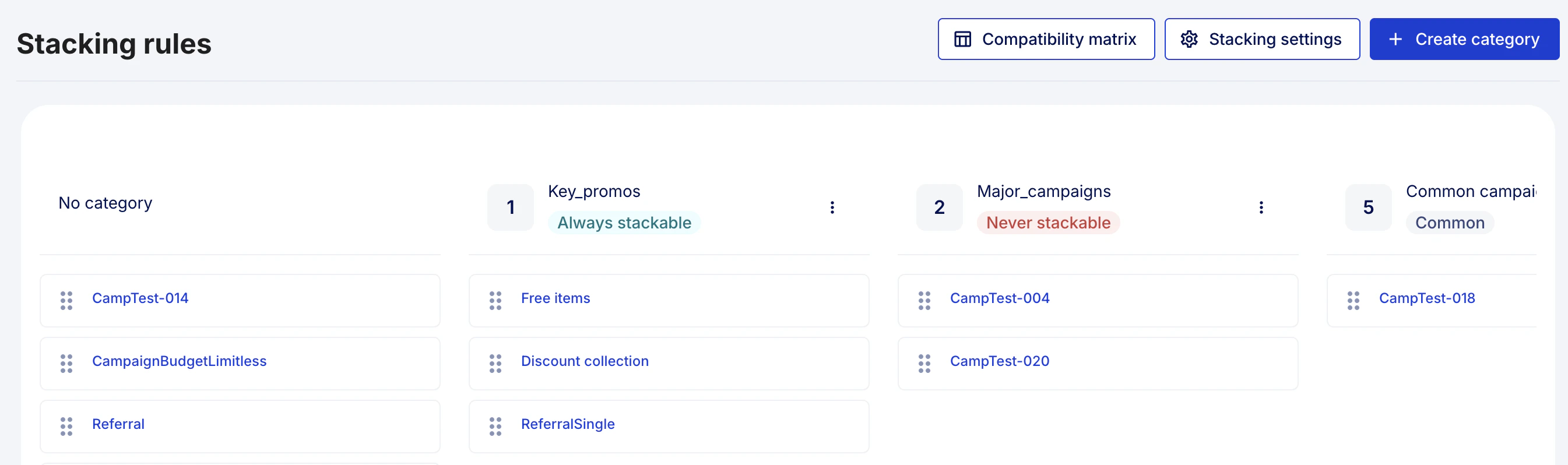
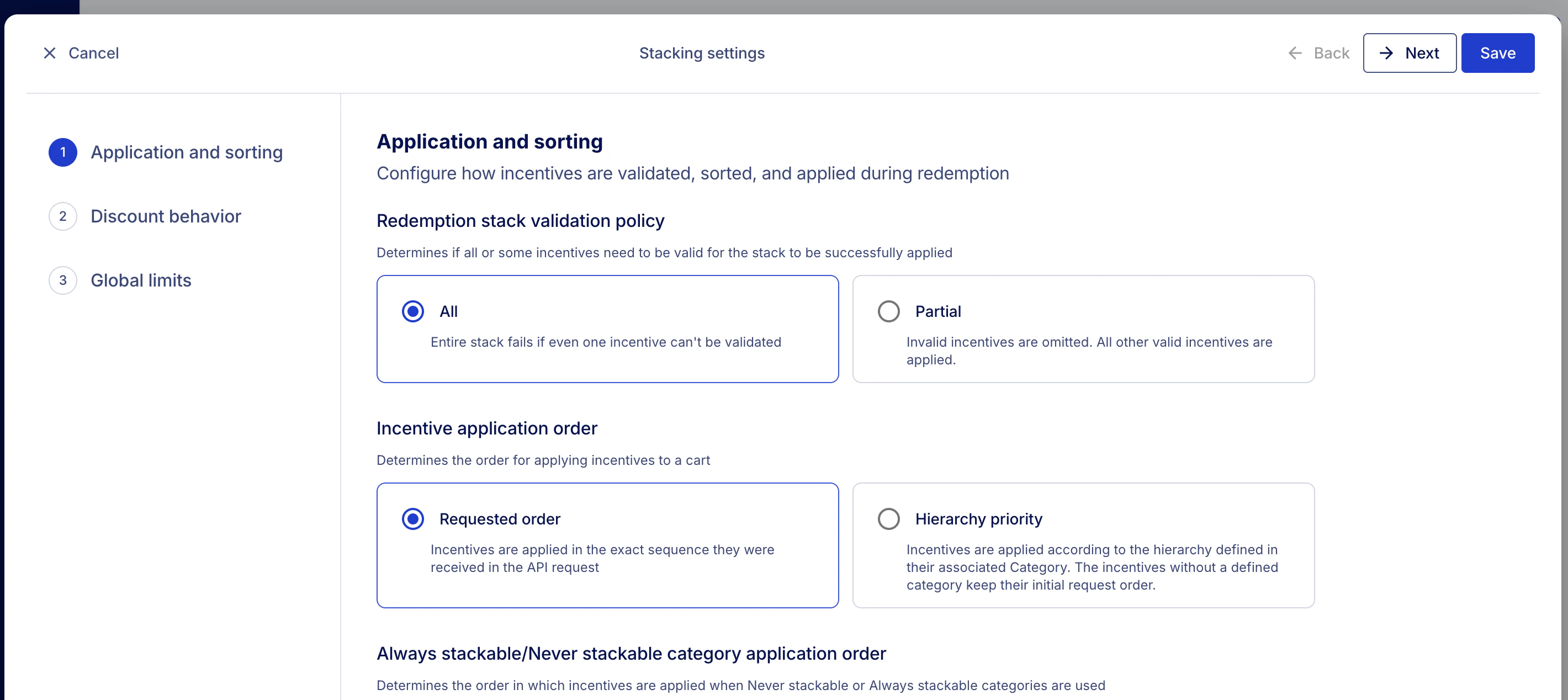
Stacking rules: name change list
Stacking rules: name change list
| Current setting name | New setting name |
|---|---|
| Discounts’ application rules | Application and sorting |
| Application rule - Partial - inapplicable (not met criteria) discounts are omitted - All provided promotions must be in a valid state | Redemption stack validation policy - Partial - All |
| Sorting rule - Promotions applied in an order given in request - Promotions’ calculation order defined by category hierarchy | Incentive application order - Requested order - Hierarchy priority |
| Sorting rule for grouped redeemables - Apply Joint categories last - Apply Sorting rule to combined Joint and Exclusive categories | Always stackable/Never stackable category application order - Apply Always stackable categories last - Apply Sorting rule to combined Always stackable and Never stackable categories |
| Products application rule - Always stack - allow multiple discounts to a product - Apply only once - prevent multiple discounts to the same product | Product stack policy - Multiple application - Single application |
| Rollback Order Mode - With order - The discounts will be reverted and order will be canceled - Without order - The discounts and status will be kept | Redemption rollback policy - Revert - Keep |
| No Effect Rule - Redeem anyway - even where there is no effect applied - Skip - redeem only when there is an effect applied | No effect - Force redemption - Prevent redemption |
| Limit Settings for Stackable Discounts API | Global limits |
| Maximum count of redeemables in API request | Maximum number of incentives in a request |
| Maximum count of valid promotions to apply in a request | Maximum number of valid incentives to apply in a request |
| Maximum count of valid promotions per category to apply in a request | Maximum number of valid incentives per category to apply in a request |
| Maximum count of valid exclusive promotions to apply in a request | Maximum number of valid Never stackable incentives to apply in a request |
| Maximum count of valid exclusive promotions per category to apply in a request | Maximum number of valid Never stackable incentives per category to apply in a request |
| Campaigns Stacking Eligibility - Never Stackable (Exclusive) - Always Stackable (Joint) | Stacking eligibility (in the Category editor) - Common - Never stackable - Always stackable |
| Discount Calculations by Category - Based on Initial Amount - Based on Discounted Amount | Discount calculation mode - Based on discounted amount - Based on initial amount |
Required permissionsUsers with the User role can view Stacking rules and Categories, edit category name and hierarchy, as well as assign campaigns to categories.However, only Admins and custom roles with Access Project settings and Modify base Project Details can modify stacking settings in Categories and Stacking settings.
- What happens when one incentive is invalid
- The order in which incentives are applied
- How percentage discounts are calculated
- How incentives interact on the same product
- What happens during rollback
- What happens when an incentive has no effect
- How many incentives can be applied at once
Stacking rules and categoriesSome stacking settings depend on the configuration of Categories and campaign assignment to them.Read Manage categories to learn more about configuring categories.
Application and sorting
These settings define how incentives are ordered, validated, and redeemed.Redemption stack validation policy
This setting defines what happens if one incentive in a request fails validation:- All: If one incentive is invalid, the whole request fails. No incentives are applied.
- Partial: Invalid incentives are skipped. Valid incentives are applied.
Incentive application order
This setting defines the order in which incentives are applied:- Requested order: Incentives are applied in the same order as they appear in the API request.
- Hierarchy priority: Incentives are applied based on category hierarchy. A lower hierarchy number means higher priority. If two incentives have the same hierarchy, the request order is used.
Always stackable and Never stackable category application order
This setting defines how incentives from Always stackable and Never stackable categories are ordered:- Apply Always stackable categories last: Never stackable incentives are applied first. Always stackable incentives are applied afterward. In effect, this setting ignores the hierarchies of the Always stackable and Never stackable categories when incentives from these categories are used together.
- Apply sorting rule to combined Always stackable and Never stackable categories: All incentives are grouped together. The selected Incentive application order defines their application order.
Discount calculation mode
This setting defines how percentage discounts are calculated when multiple incentives are applied:- Based on discounted amount: Each discount is calculated after previous discounts are applied.
- Based on initial amount: Each discount is calculated from the original price.
Discount behavior
These settings define how incentives behave on products and during rollback.Product stack policy
This setting defines if multiple incentives can affect the same product:- Multiple application: More than one incentive can affect the same product.
- Single application: Only one incentive can affect the same product. The incentive is applied according to the Incentive application order.
Redemption rollback policy
This setting defines what happens when a redemption is rolled back:- Revert: Applied discounts are removed. The order status changes to Canceled.
- Keep: Applied discounts remain, preserving the order history. The order status does not change.
No effect
This setting defines what happens when an incentive produces no effect:- Force redemption: The incentive is marked as redeemed even if it produces no effect.
- Prevent redemption: The incentive is redeemed only when it produces an effect.
No effect usually occurs if a discount coupon is used together with a cart promotion and one of them results in applying a 0 discount.No effect may also happen when a loyalty card is used to pay with points, but in combination with other discounts it doesn’t take effect and no points are used.